
pilots.school

Exam simulation for the PPL theory exam

Test yourself under exam conditions and get used to how the exam software works and handles before it counts: you choose the subjects, the number of questions and the time, work through each subject with its own clock on an interface modelled on the exam software, and receive a result per subject, the explanations and a PDF report as proof of performance.

If you already know the question list, marking, calculator and hand-in, you lose no time and no nerves on exam day and can concentrate fully on the questions.

What the exam simulation can do

Own time per subject

Each subject is a separate exam paper with its own clock. When time runs out, the subject is handed in automatically. Subjects you do later keep their full time.

Choose subjects, questions and time

Take the whole exam with all subjects or just single ones, each with its own number of questions and time. One click sets all subjects to the reference values of the real exam.

75 % in every subject

Each subject is graded separately, without hints and without negative marking for wrong answers. From 75 % a subject counts as passed, just like in the real exam.

Practise the exam software

Question list with markers, previous and next, marking, calculator, figures you can enlarge and a hand-in with confirmation: you get used to the handling and flow before it counts.

Evaluation with explanations

After hand-in you see every question with your answer, the correct solution and the explanation, so that mistakes turn into knowledge.

PDF report as proof of performance

With one click you create a PDF report with your name, the results of all subjects including processing time and your learning progress per chapter. Handy for you and your flight school.

How a simulation works

  1. Choose subjects. You decide which subjects you take and how many questions and how much time each subject gets.
  2. Start a subject. In the subject list you start the subjects in any order. You can take a break between subjects.
  3. Hand in a subject. Every subject must be handed in, either by you or automatically when time runs out. You immediately see the result and the pass mark.
  4. Overall result and PDF. At the end you get the overview of all subjects. You can download the PDF report at any time, even after only some of the subjects; subjects not taken appear as “not tested”.

Get used to how the exam software works

The simulation is modelled on the exam software. These are the moves you practise until they come naturally:

Subject list

Start each subject separately (“Ready”), in any order and with a break in between.

Question list

All questions on the left, with a tick for answered and a pin for marked. One click jumps to any question.

Previous, next, mark

Move through the questions with the buttons or the arrow keys, mark anything you are unsure about and find it again later.

Calculator

An on-screen calculator for navigation and performance tasks, quickly reachable in the toolbar.

Figures

Click maps, diagrams and graphics to enlarge them, so you handle them confidently on exam day.

Time display

The clock for each subject runs visibly and turns red in the last minutes. You get a feel for your pace.

Answers by keyboard

Choose answers with the keys 1 to 4 and move on with the arrow keys if you prefer to be quick.

Hand-in

Finish with a confirmation and a note about unanswered questions. There is no way back afterwards, just like in the exam.

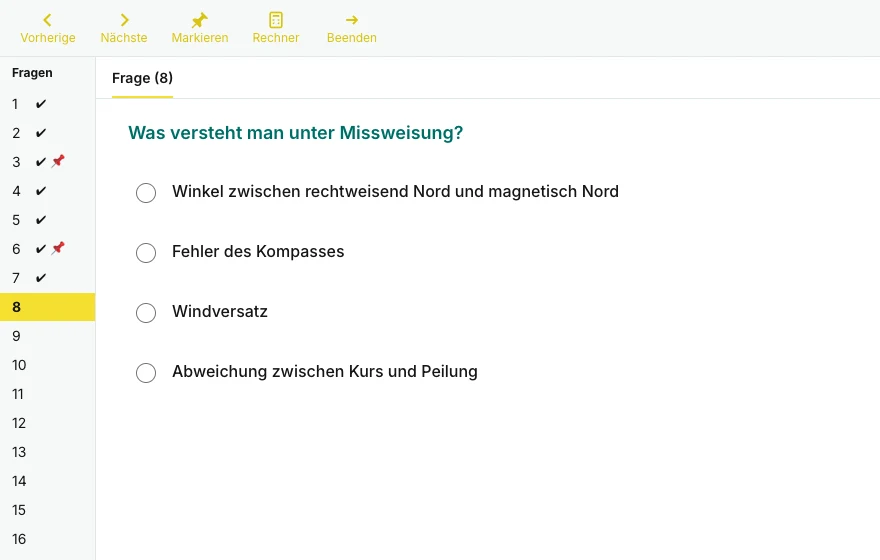
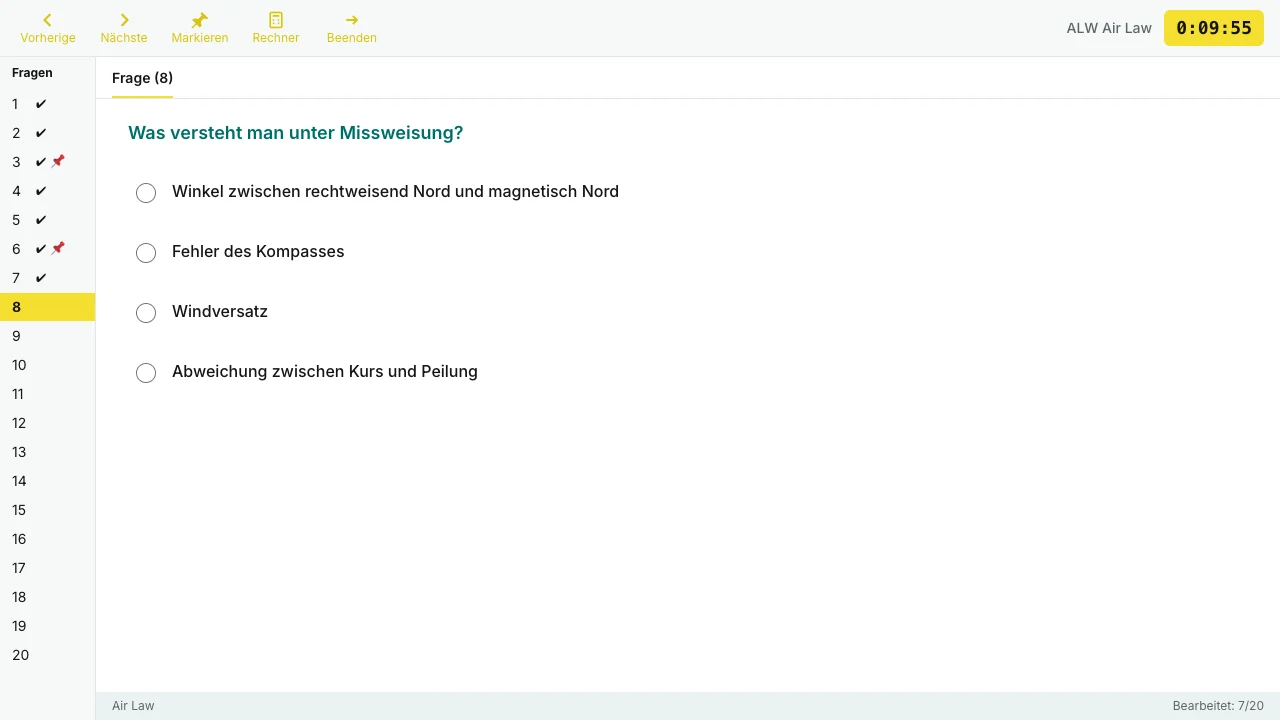
The exam interface with question list, markers, calculator and timer
The exam interface: question list with markers, timer, calculator and hand-in. The questions in the picture are examples.
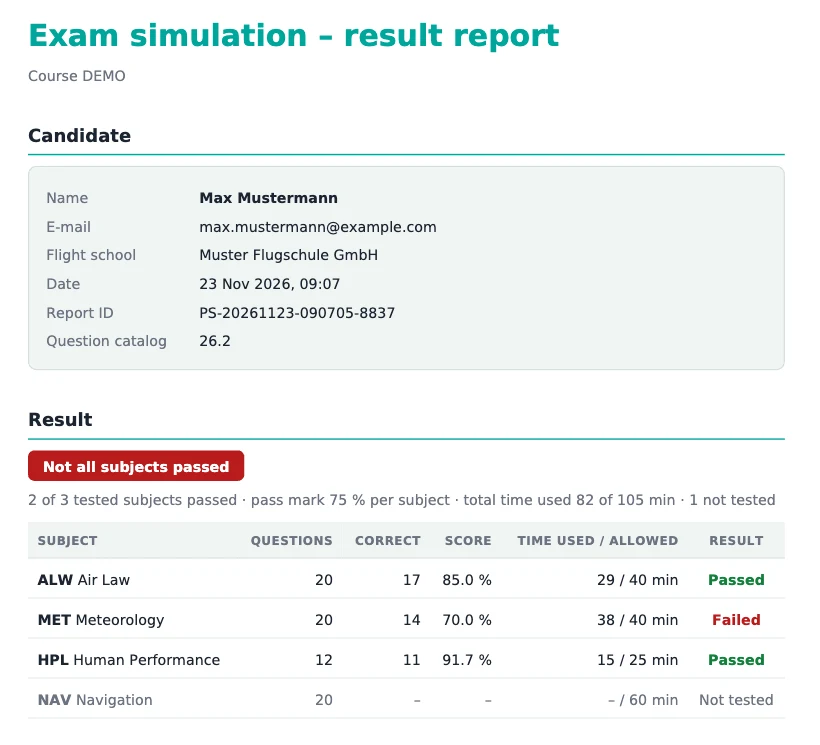
Example of a PDF report with results per subject and processing time
The PDF report: result, time per subject and learning progress per chapter. Example with fictitious data.
Download sample report as PDF

Complete report with results per subject, processing times, learning progress of all chapters and a confirmation field. Fictitious data, English, 3 pages.

For flight schools: documentation for audits

The PDF report is meant as a training record for the student file. It documents the progress of your students verifiably, without copying results by hand.

  • Clearly attributable: name, e-mail address, flight school (from the profile), course, date with time and a separate report ID for each report.
  • Traceable results: per subject number of questions, correct answers, percentage, pass mark and processing time compared with the time allowed.
  • Training status included: the learning progress per chapter from training and the version of the question catalogue.
  • Confirmation by the instructor: a field for name, date, signature or stamp and remarks.
  • Also for partial results: subjects not taken are explicitly listed as “not tested” in the report.

View the sample report (PDF)

Note: whether a report is sufficient for a particular audit is determined by your supervisory authority and the scope of the audit. The report is a practice record and not part of any regulatory examination. There is also a package for flight schools and instructors, get in touch.

Reference values of the real exam

The default settings of the simulation are based on the subject processing times of Austro Control for PPL(A) and PPL(H). The number of questions and the time per subject can differ depending on the authority and exam version.

SubjectQuestionsTo pass (75 %)Time
Air Law201540 min
Human Performance12925 min
Meteorology201540 min
Communications12925 min
Principles of Flight12925 min
Operational Procedures12925 min
Flight Performance and Planning12925 min
Aircraft General Knowledge12925 min
Navigation201560 min
Total132290 min

Source: Austro Control, “Subject processing times PPL (A) / PPL (H)” (DC_LFA_ACW_034, as of 22 Oct 2021).

Try it out: 90 demo questions for free.

Start free

Why an exam simulation?

Knowledge and exam routine are two different things. If you have played through each subject once under time pressure, without hints and with a hand-in, you know the rhythm: how much time is there per question, when do I skip, when do I use the calculator? That takes the nerves out of exam day and shows in which subjects there are still gaps. The simulation complements the training with learning levels, in which you first learn the questions securely.

Frequently asked questions

Is the exam simulation the real exam?

No. It is practice modelled on the exam software. The questions are drawn from the question catalogue of your course, the interface and flow are replicated. The simulation is not part of any regulatory examination, and its result is not an exam performance in the regulatory sense.

Can I use it to practise the exam software?

Yes, that is a main purpose. Subject list, question list with markers, previous and next, marking, calculator, figures, time display and hand-in with confirmation are modelled on the exam software. Once you have played it through, you no longer have to get used to the technology on exam day. The interface is a replica and not identical to the exam software; details may differ.

Does the simulation change my learning statistics?

No. The simulation writes nothing to your statistics. The learning progress in the PDF report is the status from training at the time of the report.

Do I have to take all subjects?

No. You choose in advance which subjects you take and can also practise just a single subject. The order is free, but every subject you start must be handed in.

What is in the PDF report?

Your name, your e-mail address and, if stored in your profile, your flight school, the date with time, a report ID, the results of all subjects handed in with questions, points, percentage and processing time, your learning progress per chapter, a confirmation field for the instructor as well as logo, address and timestamp in the footer. The report is in English.

Can flight schools use the report for audits?

The report is meant as a training record for the student file: with report ID, timestamp, results per subject including processing time, learning progress and a field for confirmation by the instructor. Whether it is sufficient for a particular audit is determined by your supervisory authority. It is a practice record and not part of any regulatory examination.

Can I try the exam simulation for free?

Yes, in the demo course with the 90 demo questions. The full simulation with all questions of your course comes with the booked course.

Related pages

How does the EASA theory exam work? : Training methods

Keep reading

All infopages →